How Does Communication Work on a DICOM Network?
If you work with medical imaging systems, you’ve probably wondered why two DICOM devices simply refuse to “talk” to each other, even when they’re on the same network. The answer almost always lies in the DICOM communication protocol configuration — a topic many healthcare and IT professionals underestimate until they face real integration problems.
DICOM communication goes far beyond a simple image file format. The standard actually defines a complete network service language that orchestrates the entire digital clinical workflow. For a comprehensive overview of the DICOM ecosystem, check out our complete guide to DICOM in clinical practice.
In This Article
Application Entities: Identifying Devices on the DICOM Network
Every device on a TCP/IP network has its own IP address — you already know that. But in the DICOM world, there’s an additional identification layer: the Application Entity (AE). An AE corresponds to any DICOM application running on a networked device, whether it’s an archive server (PACS), a viewing workstation, a DICOM printer, or an acquisition modality like a CT scanner.
Beyond the standard IP address, each AE receives a unique name called the Application Entity Title (AET). The AET can have up to 16 characters, and in practice, intuitive names like PACSSERVER, CTWORKSTATION1, or ARCHIVE work best — preferably uppercase, without spaces or special characters.
AE = Application, Not Computer
A critical detail many people overlook: AE titles identify applications, not machines. Nothing prevents a single computer from running multiple DICOM applications simultaneously — server, workstation, print server. In practice, this is quite common. Each application gets a different AET, and other network devices can communicate with a specific application rather than the entire machine.
To configure your device on a DICOM network, three parameters are essential:
- AET (AE Title) — alphanumeric, up to 16 characters. Think names like
CTWORKSTATION1orPACS_SERVER. - AE IP address — must be reserved and fixed for that application.
- Port number — DICOM’s default port is 104, but any available port works as long as it’s consistent across the network.
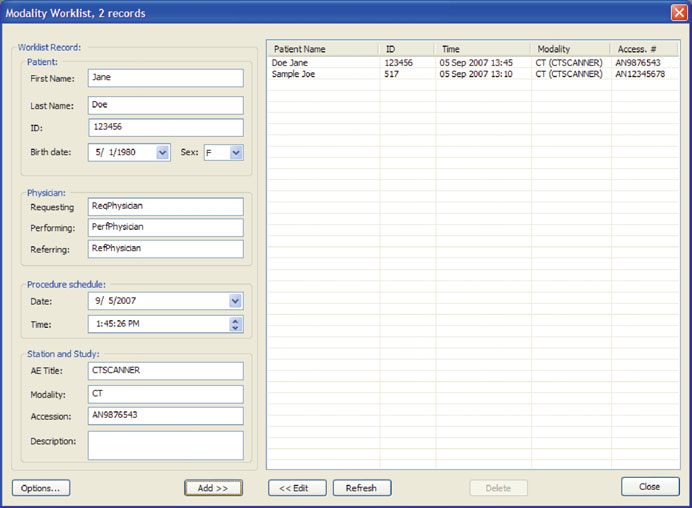
The port plays a crucial role when multiple DICOM applications run on the same computer. While different AETs identify each application, different port numbers separate them at the network layer. A single AE can even have two ports: one for sending and another for receiving — a feature most modern DICOM software supports.
Services and Data: The SCU/SCP Model
The communication model adopted by DICOM is elegant in its conceptual simplicity: Application Entities provide services to each other. One AE can request a service from another, and that entity provides the requested service.
In DICOM terminology, the AE requesting a service is the Service Class User (SCU), and the one providing it is the Service Class Provider (SCP). For example, when a CT scanner sends images to a digital archive, the scanner acts as the SCU and the archive acts as the Storage SCP.
DICOM Service Classes associate one or more Information Objects (IODs) with one or more commands. If this sounds abstract, think about image printing: the Print Management Service Class combines the print command with image IODs (CT, MR, etc.). Any DICOM printer can act as the SCP for this service, and any device sending images for printing acts as the SCU.
This model is the foundation of all DICOM communication. If you’ve already read about DICOM objects and data structures, you’ll see how services and data naturally complement each other.
DIMSE: The DICOM Network Service Language
How do AEs request services from each other? The same way humans do: by sending messages. In DICOM, these service messages are called DICOM Message Service Elements (DIMSE). The DIMSE protocol sets the rules for service exchange — the backbone of DICOM networking.
Each DIMSE service typically has two components: a request message and a response message. Requests are sent by SCU AEs — for example, a CT scanner trying to store an image in the archive — and responses are provided by SCP AEs.
Command Objects vs. Data Objects
DICOM needs to distinguish service attributes from data attributes. For this, it reserves group 0000 for all service tags, calling these objects DICOM Command Objects. The actual data (images, patient information) follows in groups 0008 and higher as Data Objects.
When a service needs to transfer data along with the command, the Data Set Type attribute (0000, 0800) indicates this. If its value is 0101 (NULL in DICOM), no data is attached. Any other value means a Data Object follows immediately after the Command Object. DICOM services act as “shuttles” transporting data between Application Entities.
DIMSE services dealing with composite data are called DIMSE-C (like C-Store for storing images), while those dealing with normalized data are DIMSE-N. The “C” or “N” prefix identifies the type of data the service handles.
C-Echo: The DICOM Ping That Saves Your Day
C-Echo is by far the simplest DIMSE service — and probably the one you’ll use most in practice. It verifies whether two DICOM AEs are properly connected. It’s the famous “DICOM ping.”
Important: it’s not enough for two devices to be physically connected by a network cable. It’s also not enough to successfully ping one from the other using TCP/IP. A successful ping only proves the devices are on the same TCP/IP network — it guarantees absolutely nothing about DICOM connectivity. The only way to confirm that two AEs are properly configured is to C-Echo one from the other.
How C-Echo Works
The flow is straightforward: the requesting AE sends a C-Echo-Rq (request). If the receiving AE responds with a valid C-Echo-Rsp (response), the two are properly DICOM-connected. C-Echo is purely a Command Object — it carries no data (Data Set Type is 0101, or NULL).
Key fields in the C-Echo message:
- Affected Service Class UID:
1.2.840.10008.1.1— unique identifier for the C-Echo service - Command Field:
0030for Rq,8030for Rsp (the leading 8 digit differentiates responses from requests) - Message ID: unique 2-byte number identifying each message during its brief lifespan
- Status:
0000in C-Echo-Rsp indicates success
C-Echo is considered failed only if no response returns within the timeout interval (usually a few seconds). For more complex DIMSE services, non-zero Status field values indicate warnings or errors — such as an unavailable image for printing.
Common DICOM Network Configuration Mistakes
From my experience working with DICOM integrations, these are the most frequent mistakes I see in the field:
- Asymmetric AE configuration: Adding the scanner’s settings to the archive but forgetting to add the archive’s settings to the scanner. Result: nothing works, and it takes another day to schedule support.
- Port conflicts: Using the same port for two different DICOM applications on the same computer, or insisting on port 104 when it’s already taken. Best practice is to use high ports (10000+) when avoiding the default.
- AET with special characters: Using spaces, accents, or punctuation in AE Titles. While technically possible with some software, it’s a recipe for interoperability problems.
Limitations and When Not to Use Traditional DIMSE
While DIMSE has been the foundation of DICOM communication for decades, it’s not the solution for everything:
- High-scale performance: Traditional DIMSE protocol can be slow for massive data transfers. Protocols like DICOMweb (WADO-RS, STOW-RS) are more modern HTTP/REST-based alternatives.
- Non-local networks: DIMSE was designed for LANs. For internet communication or between distant sites, consider DICOMweb or VPN solutions.
- Integration with non-DICOM systems: When interoperability involves HL7 FHIR or other standards, DIMSE alone won’t suffice. You need additional integration layers.
If you want to understand how these protocols integrate with more complex DICOM commands and objects, check out the deep dive on DICOM commands and objects.
Next Steps
Mastering DICOM communication is essential for any professional working with medical imaging systems. With the concepts of AE, SCU/SCP, and DIMSE we explored here, you have the foundation needed to diagnose connectivity issues, configure new devices, and understand what really happens when your equipment “talks” on the network.
If you’re planning a new integration or facing communication problems between devices, always start with C-Echo — it’s the fastest and most reliable diagnostic tool in the DICOM world.