
DICOM Objects and Data Encoding: What Every Professional Should Know
If you work with medical imaging, you’ve likely encountered situations where an exam simply “won’t open” or appears corrupted on another system. More often than not, the root cause lies in how DICOM data is encoded and structured internally. Understanding how DICOM objects work isn’t just technical curiosity — it’s the skill that separates the professional who solves problems from the one who merely reports them.
In this article, we’ll dive deep into the anatomy of DICOM objects: how data elements are encoded, the difference between implicit and explicit encoding, how SQ sequences work, and the Patient-Study-Series-Image hierarchy. For a comprehensive overview of the DICOM standard, check out our complete practical guide to DICOM for medical imaging systems.
In This Article
Private Data Dictionary and DICOM Commands
The DICOM Data Dictionary (PS3.6) maps every real-world attribute to a numeric tag in (Group, Element) format. But what happens when a manufacturer needs to store proprietary information that doesn’t exist in the standard dictionary?
The answer lies in private groups — odd-numbered groups reserved exclusively for vendor-specific data. For instance, TeraRecon uses group 0077 in its Aquarius system to store attributes like (0077,0010) for original series UIDs and (0077,0020) for binary data names. Each manufacturer picks their own odd group, ensuring their proprietary data won’t conflict with the standard.
DICOM commands — such as Print, Store, Move, and Get — are encoded using the reserved 0000 group. Element (0000,0100) identifies the command type, while (0000,0110) stores the message ID. Unlike data elements, DICOM does not support proprietary command attributes, which limits protocol flexibility for modern scenarios like teleradiology.
Current Command System Limitations
The DICOM command set was designed for local PACS architectures that are becoming increasingly outdated. Modern digital imaging projects — teleradiology, cloud integration, AI-driven workflows — demand more flexible command structures. The inability to create proprietary command tags remains an active discussion within the DICOM community. For a deeper look at how commands work in practice, our article on DICOM fundamentals: objects and communications explores DIMSE services in detail.
Implicit vs. Explicit Encoding: How DICOM Writes Data
All information in DICOM is converted to byte sequences through two fundamental encoding methods: implicit and explicit. The choice between them directly affects how your systems interpret data.
Implicit Encoding (Implicit VR)
With implicit encoding — the DICOM default — each data element follows this structure:
- Tag: 4 bytes (2 for Group + 2 for Element)
- Value Length: 4 bytes (32-bit integer)
- Value: $L$ bytes of data
Consider the patient name “Smith^Joe”: element (0010,0010) is encoded in 18 bytes. The first 4 bytes represent the tag in Little Endian (10 00 10 00), the next 4 bytes indicate the length $L = 10$ (0A 00 00 00), and the final 10 bytes contain the string “Smith^Joe ” with trailing space padding to maintain even length.
0010 is written as 10 00 in the binary stream.
Explicit Encoding (Explicit VR)
Explicit encoding adds the VR type to each element, splitting into two variants:
For standard VRs (except OB, OW, OF, SQ, UT, UN): the 4-byte length field is replaced by 2 bytes of VR type + 2 bytes of length. For “Smith^Joe”, we’d see: 10 00 10 00 50 4E 0A 00 53 6D... — where 50 4E are the ASCII characters “PN” indicating Person Name.
For special VRs (OB, OW, OF, SQ, UT, UN): after the 2-byte VR, there are 2 reserved bytes (always 0000) followed by 4 bytes for length. This variant accommodates elements with potentially very large data payloads, such as pixel buffers.
When Should You Use Each Method?
You cannot mix implicit and explicit encoding within the same DICOM object. This decision is negotiated between applications before any data exchange, through Transfer Syntaxes. In my experience, explicit encoding is preferable for interoperability because it carries type information alongside the data, reducing decoding errors — especially with proprietary attributes absent from the standard dictionary.
DICOM Objects and SQ Sequences: Nested Structures
A DICOM object is essentially an ordered collection of data elements. Every medical image, command, or report is wrapped in this format. Elements within an object are organized in ascending tag order — this ordering isn’t just convention but a validation tool: if an element with a lower tag appears after one with a higher tag, the object is corrupted.
The real complexity arises with the SQ (Sequence) VR type. SQ elements don’t hold simple data — they encapsulate sequences of other DICOM objects, creating a tree-like structure. Think of a book: chapters contain sections, which contain subsections. Similarly, a DICOM object can contain nested objects across multiple levels.
SQ Sequence Encoding
Each object within an SQ sequence is preceded by the delimitation tag (FFFE,E000), followed by either:
- Explicit length: a numeric value indicating how many bytes the object occupies
- Undefined length: the value
FFFFFFFF, where the end of the object is marked by tag(FFFE,E00D)
The entire SQ sequence can also have explicit or undefined length. In the latter case, the end is marked by (FFFE,E0DD). This delimiter approach is analogous to XML opening and closing tags — and in practice, it’s more reliable than explicit length.
Real-World Example: Referenced Series Sequence
A practical case of SQ nesting is the (0008,1115) attribute — Referenced Series Sequence. At level 0, we have the SQ; at level 1, the Series Instance UID (0020,000E) appears alongside another sequence (0008,114A); and at level 2, we find the reference UIDs (0008,1150) and (0008,1155). If you’re coding SQ encoding, implementing it with recursion comes naturally — just like any tree-based data structure.
DICOM Information Hierarchy: Patient-Study-Series-Image
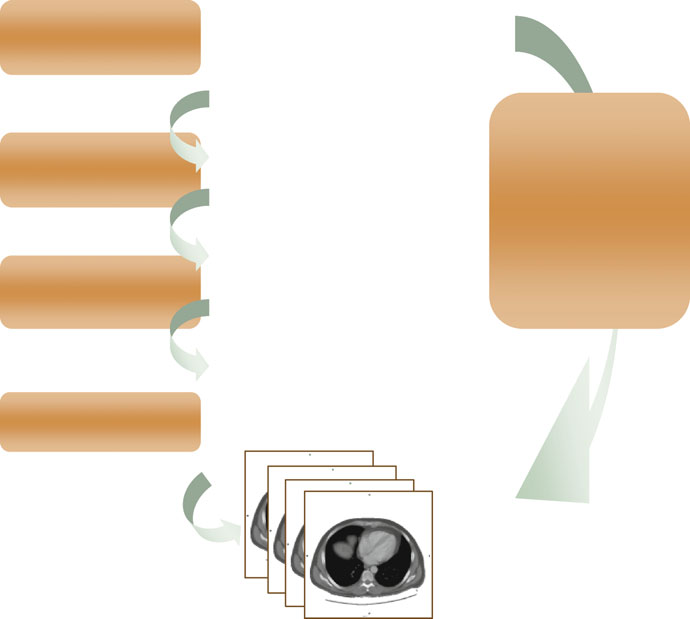
DICOM organizes all information into four hierarchical levels that mirror the actual clinical workflow: Patient → Study → Series → Image.
- Patient: identified by Patient ID
(0010,0020) - Study: identified by Study Instance UID
(0020,000D) - Series: identified by Series Instance UID
(0020,000E) - Image: identified by SOP Instance UID
(0008,0018)
This hierarchy exists because in clinical practice, a patient may have multiple studies (CT, MRI, US), each study contains series with different protocols, and each series has one or more images. UIDs ensure each entity is globally unique — UI format with up to 64 characters made of digits and periods, such as 1.2.840.10008.1.2.
Unique Identifiers (UIDs): Why Are They Global?
Picture an X-ray image being copied, annotated, and sent for teleradiology reading in another country. Now several instances of the same original image exist, each potentially modified. How do you tell them apart? Through distinct UIDs for each instance. A UID follows the structure <org root>.<suffix>, where the root identifies the organization and the suffix ensures uniqueness within that scope.
Common DICOM Structuring Mistakes and How to Avoid Them
After years of working with imaging system integration, certain problems keep surfacing with alarming frequency:
1. Inconsistent Patient IDs: Hospitals assigning different IDs to the same patient depending on the modality or image destination. I’ve seen cases where the ID “W/I” (without ID) was assigned to every unregistered patient, effectively merging dozens of patients into a single PACS record. If no ID is available, using initials with birth date (e.g., JS19670102) is infinitely better than a generic placeholder.
2. Missing required elements: Film digitizers frequently wrap images in DICOM format without including all mandatory (Type 1) tags. A blank Patient ID can be interpreted as a wildcard, merging different patients in the archive. DICOM objects missing required elements are considered illegal by the standard.
3. Incorrect Group Length tags: Tag (gggg,0000) used to store the total length of a group. Although retired since 2008, many implementations still write it incorrectly. The result? Conservative DICOM software may reject the entire object. The current recommendation: don’t include it, but know how to read it when present.
When NOT to Parse DICOM Data Manually
There are scenarios where manually parsing DICOM objects creates more problems than it solves:
- UIDs as data sources: Never extract information (dates, patient IDs) from UIDs. DICOM explicitly prohibits this — UIDs can be changed at any time
- Implicit-to-explicit conversion with proprietary tags: If an odd-group attribute doesn’t exist in the standard dictionary, conversion to explicit VR may fail. Use the UN (Unknown) type in these cases
- Multi-level SQ objects with explicit length: A 1-byte error in the length value makes all subsequent data unreadable. Prefer undefined-length delimiters
Deep understanding of DICOM encoding is what enables you to diagnose interoperability issues that automated tools can’t resolve. To master the core concepts of the standard, be sure to read our complete guide to DICOM in clinical practice.